
Subjects
How To Use An Interactive Whiteboard & Incorporate One Into Your Online Lessons
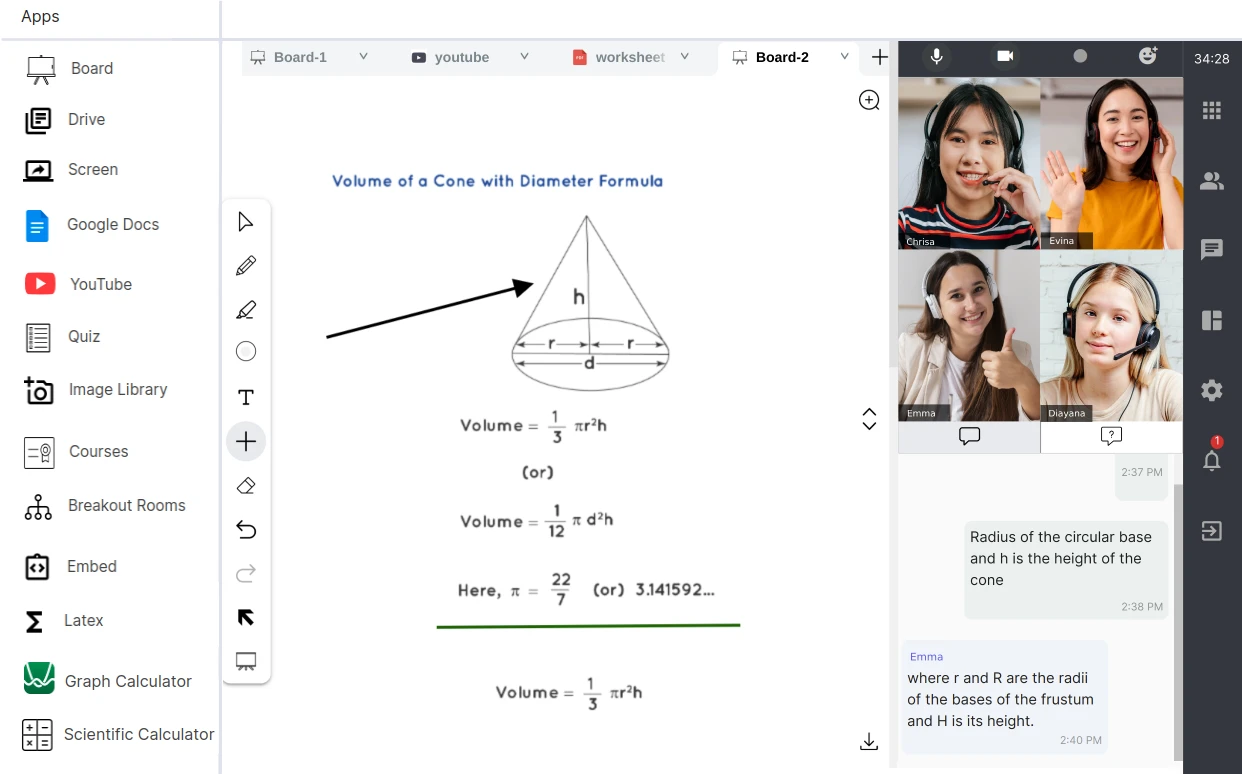
In traditional tutoring, a whiteboard is an essential tool—it allows tutors to explain concepts visually, work through problems in real time, and keep students engaged with dynamic demonstrations.
Moving online, however, replacing that “real” whiteboard can be challenging: static slides or screen sharing often fail to replicate the interactivity and spontaneity of in-person sessions.
This is where an interactive whiteboard comes in. In a virtual context, it’s a digital space where both tutor and student can write, draw, and manipulate objects in real time, creating a collaborative learning environment.
In this article, we’re going to show you how incorporating an interactive whiteboard into your online lessons can make sessions more engaging, visually clear, and hands-on, helping bridge the gap between in-person and virtual tutoring.
So let’s jump right in:
What Is an Interactive Whiteboard and How Does It Work?
An interactive whiteboard is a digital tool that allows tutors and students to write, draw, and manipulate content in real time during online lessons.
It works by creating a shared virtual space where both parties can interact with text, images, diagrams, and other learning materials using a mouse, stylus, or touchscreen.
Many platforms also include features like sticky notes, drag-and-drop activities, annotation tools, and the ability to save or export work. Simulating the experience of a physical whiteboard, it encourages collaboration, active participation, and a more engaging, hands-on approach to learning.
Choosing the Right Whiteboard Tool for Your Lessons
Choosing the right interactive whiteboard tool for your online lessons can make a big difference in how engaging and effective your sessions are.
When selecting a tool, consider free vs. paid options—free tools can be great for basic use, but paid platforms often offer advanced features, greater reliability, and better support.
It’s also important to check integration with video conferencing platforms like Zoom or Google Meet, so you can seamlessly share the whiteboard with students during lessons.
Key features to look for include real-time collaboration, the ability to save sessions for later review, support for importing PDFs and images, and handwriting or stylus input for natural note-taking and diagrams.
Some of the tools we personally recommend for online tutoring include Miro, Jamboard, and Explain Everything, as they combine ease of use with the functionality needed for interactive, engaging lessons.
How to Set up Your Online Whiteboard
Setting up your online whiteboard properly is key to making your lessons run smoothly.
Start with the basic screen set up: you’ll need a reliable device (laptop or tablet), a stylus for natural writing and drawing, and a webcam to keep face-to-face interaction with your student.
Next, think about whether you’ll use screen sharing (where students can see your whiteboard but not interact) or live collaboration (where both tutor and student can write and edit on the same board). Always test the tech before your session, checking logins, permissions, and internet stability to avoid delays.
For tutors, the ideal set up usually means a larger screen for viewing materials, a tablet or stylus for writing, and a quiet, well-lit space for teaching.
To ensure everything runs smoothly, prepare your lesson materials in advance, close unnecessary apps to prevent distractions, and have a quick backup plan (like a secondary whiteboard tool or offline material) in case of glitches. This way, you’ll feel confident and your student can focus fully on learning.
How to Make Your Online Sessions Interactive and Engaging with a Whiteboard
An online whiteboard isn’t just a tool for writing—it can transform your lessons into highly interactive and engaging experiences. To maximise engagement, tutors must know precisely how to use interactive whiteboard tools not just for writing, but for active collaboration. This means focusing on real-time problem-solving together, where you and your student work through tasks simultaneously, building confidence as they see the process unfold.
Use colour coding, drawing diagrams, and annotating texts to make explanations clear and visually appealing, helping students connect ideas more easily. Encourage learners to take control of the board and explain their thinking, as teaching back concepts often deepens understanding.
Using it for scaffolding answers step-by-step
Whiteboards are also perfect for scaffolding answers step-by-step, breaking complex problems into manageable chunks and guiding students towards independent problem solving. By making the whiteboard a shared, hands-on space, you move beyond lecturing into active, collaborative learning.
Teaching Tips and Best Practices: How to use an interactive whiteboard effectively
Prepare your whiteboard layout in advance
When using an online whiteboard, a little preparation goes a long way. Start by preparing your whiteboard layout in advance, so you’re not wasting lesson time setting things up.
Create templates (e.g. essay planning structures, maths grids)
You can even create templates for recurring activities—like essay planning structures, maths grids, or vocabulary charts—that make lessons more organised and efficient. Don’t be afraid to use the whiteboard alongside other teaching tools, such as Google Docs for collaborative writing, quizzes for quick checks of understanding, or screen sharing to bring in external resources.
Save your whiteboard sessions for revision
Finally, make a habit of saving your whiteboard sessions for revision, so students can revisit what they’ve learned and track their progress over time. This combination of planning, integration, and follow-up helps you get the most out of your whiteboard and gives students a richer learning experience.
Conclusion: Now you know how to use an interactive whiteboard for more engaging lessons.
Incorporating an interactive whiteboard into your online lessons can transform the way you teach, turning passive screen time into an active, collaborative learning experience.
By preparing layouts and templates in advance, making use of features like colour coding and real-time collaboration, and integrating the whiteboard with other digital tools, you create lessons that are engaging, clear, and student-centred.
The ability to save sessions for revision and encourage students to take control of the board also strengthens retention and independence. Ultimately, an interactive whiteboard bridges the gap between traditional and online tutoring, helping you deliver lessons that are not only effective but also dynamic and enjoyable for your students.
| If you’re looking to become an online tutor with us, contact us today — we’d love to speak with you. |